-
AWS: Wordpress + RDS ver: 2026년 07월 22일공부합시다!/Terraform 2026. 7. 22. 16:53728x90
최근 테스트 한 자료 입니다.
변수 처리하지 않은 원시코드 입니다.
코드를 제공하지 않는 이유는 가급적 본인 손으로 타이핑을 해봐야만 제대로 테라폼을 느낄 수 있기 때문이니
양해해 주시기 바랍니다.
00. init

terraform {
  required_providers {
    aws = {
      source  = "hashicorp/aws"
      version = "~> 6.51.0"
    }
  }
}

# Configure the AWS Provider
provider "aws" {
  region = "ap-northeast-2"
}
01. vpc

resource "aws_vpc" "sdkim_vpc" {
  cidr_block           = "10.0.0.0/16"
  instance_tenancy     = "default"
  enable_dns_support   = true
  enable_dns_hostnames = true

  tags = {
    Name = "sdkim-vpc"
  }
}
02. Internet Gateway

resource "aws_internet_gateway" "sdkim_ig" {
  vpc_id = aws_vpc.sdkim_vpc.id

  tags = {
    Name = "sdkim-ig"
  }
}
03. Subnet


resource "aws_subnet" "bat_a" {
  vpc_id                                      = aws_vpc.sdkim_vpc.id
  cidr_block                                  = "10.0.0.0/24"
  availability_zone                           = "ap-northeast-2a"
  enable_resource_name_dns_a_record_on_launch = true
  tags = {
    Name = "bat-a"
  }
}

resource "aws_subnet" "nat_a" {
  vpc_id                                      = aws_vpc.sdkim_vpc.id
  cidr_block                                  = "10.0.1.0/24"
  availability_zone                           = "ap-northeast-2a"
  enable_resource_name_dns_a_record_on_launch = true
  tags = {
    Name = "nat-a"
  }
}

resource "aws_subnet" "web_a" {
  vpc_id                                      = aws_vpc.sdkim_vpc.id
  cidr_block                                  = "10.0.2.0/24"
  availability_zone                           = "ap-northeast-2a"
  enable_resource_name_dns_a_record_on_launch = true
  tags = {
    Name = "web-a"
  }
}

resource "aws_subnet" "web_c" {
  vpc_id                                      = aws_vpc.sdkim_vpc.id
  cidr_block                                  = "10.0.3.0/24"
  availability_zone                           = "ap-northeast-2c"
  enable_resource_name_dns_a_record_on_launch = true
  tags = {
    Name = "web-c"
  }
}

resource "aws_subnet" "was_a" {
  vpc_id                                      = aws_vpc.sdkim_vpc.id
  cidr_block                                  = "10.0.4.0/24"
  availability_zone                           = "ap-northeast-2a"
  enable_resource_name_dns_a_record_on_launch = true
  tags = {
    Name = "was-a"
  }
}

resource "aws_subnet" "was_c" {
  vpc_id                                      = aws_vpc.sdkim_vpc.id
  cidr_block                                  = "10.0.5.0/24"
  availability_zone                           = "ap-northeast-2c"
  enable_resource_name_dns_a_record_on_launch = true
  tags = {
    Name = "was-c"
  }
}

resource "aws_subnet" "db_a" {
  vpc_id                                      = aws_vpc.sdkim_vpc.id
  cidr_block                                  = "10.0.6.0/24"
  availability_zone                           = "ap-northeast-2a"
  enable_resource_name_dns_a_record_on_launch = true
  tags = {
    Name = "db-a"
  }
}

resource "aws_subnet" "db_c" {
  vpc_id                                      = aws_vpc.sdkim_vpc.id
  cidr_block                                  = "10.0.7.0/24"
  availability_zone                           = "ap-northeast-2c"
  enable_resource_name_dns_a_record_on_launch = true
  tags = {
    Name = "db-c"
  }
}

resource "aws_subnet" "load_a" {
  vpc_id                                      = aws_vpc.sdkim_vpc.id
  cidr_block                                  = "10.0.8.0/24"
  availability_zone                           = "ap-northeast-2a"
  enable_resource_name_dns_a_record_on_launch = true
  tags = {
    Name = "load-a"
  }
}

resource "aws_subnet" "load_c" {
  vpc_id                                      = aws_vpc.sdkim_vpc.id
  cidr_block                                  = "10.0.9.0/24"
  availability_zone                           = "ap-northeast-2c"
  enable_resource_name_dns_a_record_on_launch = true
  tags = {
    Name = "load-c"
  }
}
04. Internet Gateway Routing Table

resource "aws_route_table" "igrt" {
  vpc_id = aws_vpc.sdkim_vpc.id

  route {
    cidr_block = "0.0.0.0/0"
    gateway_id = aws_internet_gateway.sdkim_ig.id
  }

  tags = {
    Name = "igrt"
  }
}
05. Internet Gateway Routing Table + Subnet

resource "aws_route_table_association" "igrt_bat" {
  route_table_id = aws_route_table.igrt.id
  subnet_id      = aws_subnet.bat_a.id
}

resource "aws_route_table_association" "igrt_nat" {
  route_table_id = aws_route_table.igrt.id
  subnet_id      = aws_subnet.nat_a.id
}

resource "aws_route_table_association" "igrt_loada" {
  route_table_id = aws_route_table.igrt.id
  subnet_id      = aws_subnet.load_a.id
}

resource "aws_route_table_association" "igrt_loadc" {
  route_table_id = aws_route_table.igrt.id
  subnet_id      = aws_subnet.load_c.id
}
06. Elastic IP

resource "aws_eip" "bat_pip" {
  domain = "vpc"

  tags = {
    Name = "bat-pip"
  }
}

resource "aws_eip" "natgw_pip" {
  domain = "vpc"

  tags = {
    Name = "natgw-pip"
  }
}

resource "aws_eip_association" "bat_eip" {
  instance_id   = aws_instance.sdkim_bat.id
  allocation_id = aws_eip.bat_pip.id
  depends_on    = [aws_instance.sdkim_bat]
}
07. NatGateway
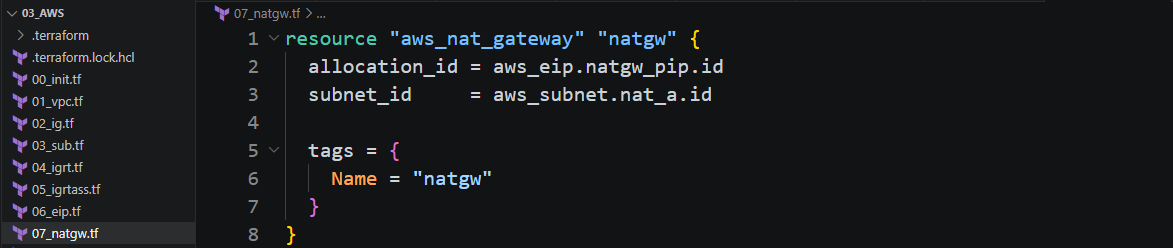
resource "aws_nat_gateway" "natgw" {
  allocation_id = aws_eip.natgw_pip.id
  subnet_id     = aws_subnet.nat_a.id

  tags = {
    Name = "natgw"
  }
}
08. NatGateway Routing Table

resource "aws_route_table" "natgw_rt" {
  vpc_id = aws_vpc.sdkim_vpc.id

  route {
    cidr_block = "0.0.0.0/0"
    gateway_id = aws_nat_gateway.natgw.id
  }

  tags = {
    Name = "natgw-rt"
  }
}
09. NatGateway Routing Table + Subnet

resource "aws_route_table_association" "natgwrt_weba" {
  route_table_id = aws_route_table.natgw_rt.id
  subnet_id      = aws_subnet.web_a.id
}

resource "aws_route_table_association" "natgwrt_webc" {
  route_table_id = aws_route_table.natgw_rt.id
  subnet_id      = aws_subnet.web_c.id
}
10. Key Pair

resource "aws_key_pair" "sdkim_key" {
  key_name   = "sdkim-key"
  public_key = file("../../Users/SEC-PRO/.ssh/id_rsa.pub")
}
11. Security Group


resource "aws_security_group" "sdkim_sg" {
  name        = "sdkim-sg"
  description = "ssh,http,mysql,icmp"
  vpc_id      = aws_vpc.sdkim_vpc.id

  ingress = [
    {
      description      = "ssh"
      from_port        = 22
      to_port          = 22
      protocol         = "tcp"
      cidr_blocks      = ["0.0.0.0/0"]
      ipv6_cidr_blocks = ["::/0"]
      security_groups  = null
      self             = null
      prefix_list_ids  = null
    },
    {
      description      = "http"
      from_port        = 80
      to_port          = 80
      protocol         = "tcp"
      cidr_blocks      = ["0.0.0.0/0"]
      ipv6_cidr_blocks = ["::/0"]
      security_groups  = null
      self             = null
      prefix_list_ids  = null
    },
    {
      description      = "mysql"
      from_port        = 3306
      to_port          = 3306
      protocol         = "tcp"
      cidr_blocks      = ["10.0.0.0/16"]
      ipv6_cidr_blocks = ["::/0"]
      security_groups  = null
      self             = null
      prefix_list_ids  = null
    },
    {
      description      = "icmp"
      from_port        = -1
      to_port          = -1
      protocol         = "icmp"
      cidr_blocks      = ["0.0.0.0/0"]
      ipv6_cidr_blocks = ["::/0"]
      security_groups  = null
      self             = null
      prefix_list_ids  = null
    }
  ]
  egress = [
    {
      description      = "all"
      from_port        = 0
      to_port          = 0
      protocol         = -1
      cidr_blocks      = ["0.0.0.0/0"]
      ipv6_cidr_blocks = ["::/0"]
      security_groups  = null
      self             = null
      prefix_list_ids  = null
    }
  ]
  tags = {
    Name = "sdkim-sg"
  }
}
12. Elastic Compute Cloud (EC2)

resource "aws_instance" "sdkim_bat" {
  ami                    = "ami-08c766d1a55d29288"
  instance_type          = "t3.micro"
  key_name               = "sdkim-key"
  availability_zone      = "ap-northeast-2a"
  private_ip             = "10.0.0.11"
  subnet_id              = aws_subnet.bat_a.id
  vpc_security_group_ids = [aws_security_group.sdkim_sg.id]
  user_data_base64 = "IyEgL2Jpbi9iYXNoCmRuZiBpbnN0YWxsIC15IGx5bnggbWFyaWFkYjEwNQ=="

  tags = {
    Name = "sdkim-bat"
  }
}

resource "aws_instance" "sdkim_weba" {
  ami                    = "ami-08c766d1a55d29288"
  instance_type          = "t3.micro"
  key_name               = "sdkim-key"
  availability_zone      = "ap-northeast-2a"
  private_ip             = "10.0.2.11"
  subnet_id              = aws_subnet.web_a.id
  vpc_security_group_ids = [aws_security_group.sdkim_sg.id]
  user_data              = file("install.sh")

  tags = {
    Name = "sdkim-weba"
  }
  depends_on = [ aws_route_table_association.natgwrt_weba,aws_db_instance.sdkim_db ]
}
13. LoadBalancer Target Group

resource "aws_lb_target_group" "sdkim_lbtg" {
  name     = "sdkim-lbtg"
  port     = 80
  protocol = "HTTP"
  vpc_id   = aws_vpc.sdkim_vpc.id

  health_check {
    enabled             = true
    healthy_threshold   = 5
    unhealthy_threshold = 3
    interval            = 10
    matcher             = "200"
    path                = "/index.html"
    port                = "traffic-port"
    protocol            = "HTTP"
    timeout             = 2
  }
}
14. Application LoadBalancer

resource "aws_lb" "sdkim_lb" {
  name               = "sdkim-lb"
  internal           = false
  load_balancer_type = "application"
  security_groups    = [aws_security_group.sdkim_sg.id]
  subnets            = [aws_subnet.load_a.id, aws_subnet.load_c.id]

  tags = {
    Name = "sdkim-lb"
  }
}
15. LoadBalancer Listener

resource "aws_lb_listener" "sdkim_lbli" {
  load_balancer_arn = aws_lb.sdkim_lb.arn
  port              = 80
  protocol          = "HTTP"

  default_action {
    type             = "forward"
    target_group_arn = aws_lb_target_group.sdkim_lbtg.arn
  }
}
16. ami(amazon Machine Image)

resource "aws_ami_from_instance" "sdkim_ami" {
  name               = "sdkim-ami"
  source_instance_id = aws_instance.sdkim_weba.id
  depends_on         = [aws_instance.sdkim_weba]
}
17. Launch Templates

resource "aws_launch_template" "sdkim_lantem" {
  name = "sdkim-lantem"
  block_device_mappings {
    device_name = "/dev/sdf"
    ebs {
      volume_size = 10
      volume_type = "gp2"
    }
  }
  image_id               = aws_ami_from_instance.sdkim_ami.id
  instance_type          = "t3.micro"
  key_name               = "sdkim-key"
  vpc_security_group_ids = [aws_security_group.sdkim_sg.id]

  tag_specifications {
    resource_type = "instance"
    tags = {
      Name = "sdkim-temp"
    }
  }
}
18. Auto Scale Group

resource "aws_autoscaling_group" "sdkim_atsg" {
  name                      = "sdkim-atsg"
  desired_capacity          = 2
  min_size                  = 1
  max_size                  = 6
  health_check_grace_period = 30
  health_check_type         = "EC2"
  force_delete              = false
  vpc_zone_identifier       = [aws_subnet.web_a.id, aws_subnet.web_c.id]

  launch_template {
    id      = aws_launch_template.sdkim_lantem.id
    version = "$Latest"
  }
}
19. LoadBalancer + Auto Scale Group

resource "aws_autoscaling_attachment" "sdkim_atsgatt" {
  autoscaling_group_name = aws_autoscaling_group.sdkim_atsg.id
  lb_target_group_arn    = aws_lb_target_group.sdkim_lbtg.arn
}
20. Database(Mysql8.0)

resource "aws_db_subnet_group" "db_sg" {
  name       = "db-sg"
  subnet_ids = [aws_subnet.db_a.id,aws_subnet.db_c.id]
}

resource "aws_db_instance" "sdkim_db" {
  allocated_storage      = 20
  storage_type           = "gp2"
  engine                 = "mysql"
  engine_version         = "8.0"
  instance_class         = "db.t3.micro"
  db_name                = "word"
  identifier             = "sdkimmysql"
  username               = "sdkim"
  password               = "It12345!"
  availability_zone      = "ap-northeast-2a"
  db_subnet_group_name   = aws_db_subnet_group.db_sg.id
  vpc_security_group_ids = [aws_security_group.sdkim_sg.id]
  skip_final_snapshot    = true
  publicly_accessible    = false

  tags = {
    Name = "sdkim-db"
  }
}
21. Output

output "bat_ip" {
  value = aws_eip.bat_pip.public_ip
}

output "natgw_ip" {
  value = aws_eip.natgw_pip.public_ip
}

output "natgw_allocation_ip" {
  value = aws_nat_gateway.natgw.public_ip
}

output "bat_public_ip" {
  value = aws_instance.sdkim_bat.public_ip
}

output "load_dns" {
  value = aws_lb.sdkim_lb.dns_name
}
22. User-Data

#! /bin/bash
wget https://ko.wordpress.org/wordpress-7.0.2-ko_KR.tar.gz
dnf install -y httpd php php-mysqlnd
tar xvfz wordpress-7.0.2-ko_KR.tar.gz
cp -ar wordpress/*  /var/www/html/
cp -ar /var/www/html/wp-config-sample.php /var/www/html/wp-config.php
echo $HOSTNAME > /var/www/html/index.html
sed -i 's/DirectoryIndex index.html/DirectoryIndex index.php/g' /etc/httpd/conf/httpd.conf
sed -i 's/database_name_here/word/g' /var/www/html/wp-config.php
sed -i 's/username_here/sdkim/g' /var/www/html/wp-config.php
sed -i 's/password_here/It12345!/g' /var/www/html/wp-config.php
sed -i 's/localhost/sdkimmysql.cn6fcv88j4vr.ap-northeast-2.rds.amazonaws.com/g' /var/www/html/wp-config.php
chown -R apache:apache /var/www/html/*
systemctl enable --now httpd
23. 접속 테스트

2026년 7월23일 Test한 자료입니다.
728x90'공부합시다! > Terraform' 카테고리의 다른 글
1.12. Azure Vnet Peering을 통한 재사용 가능한 Module 만들기: 변수 data 파일 및 output 등 (0) 2025.07.25 1.10. Azure Vnet Peering을 통한 재사용 가능한 Module 만들기: VM (0) 2025.07.25 1.9. Azure Vnet Peering을 통한 재사용 가능한 Module 만들기: NIC+NSG (0) 2025.07.25 1.8. Azure Vnet Peering을 통한 재사용 가능한 Module 만들기: NSG (0) 2025.07.25 1.7. Azure Vnet Peering을 통한 재사용 가능한 Module 만들기: NIC (0) 2025.07.25